
How to Pay Rent
Fast, Secure & Convenient Payment Options
At Laredo Town Apartments, we offer several secure ways to pay your rent. For most residents, we recommend paying through the AppFolio Resident Portal using eCheck (ACH). It's the fastest, easiest, and most economical payment option, allowing you to pay online, enroll in AutoPay, view your payment history, and download receipts anytime.
Why Choose eCheck (ACH)?
Fees vary by retailer, financial institution, and AppFolio’s payment processor.
Why Most Residents Choose eCheck
- No additional online payment fee
- Pay securely online 24/7
- Avoid costly credit card processing fees
- Avoid purchasing money orders
- Receive instant payment confirmations
- View payment history and download receipts anytime
- Enroll in AutoPay to help avoid late payments
Other Ways to Pay
If online payment isn’t the best option for you, we also accept:
- Personal Checks
- Cashier’s Checks
- Money Orders
- AppFolio Electronic Cash Payment Voucher
Please note:
- Cash and credit card payments are not accepted at the leasing office.
- Residents paying with cash can download an AppFolio Electronic Cash Payment Voucher through the Resident Portal. If you don’t have access to a printer, your Leasing Manager can print one for you.
- Please allow additional processing time for retail cash payments.
Helpful Payment Guides
Select a topic below for step-by-step instructions. You can also visit the AppFolio Resident Portal Help Center for video tutorials and additional guidance on online payments, AutoPay, and other portal features.
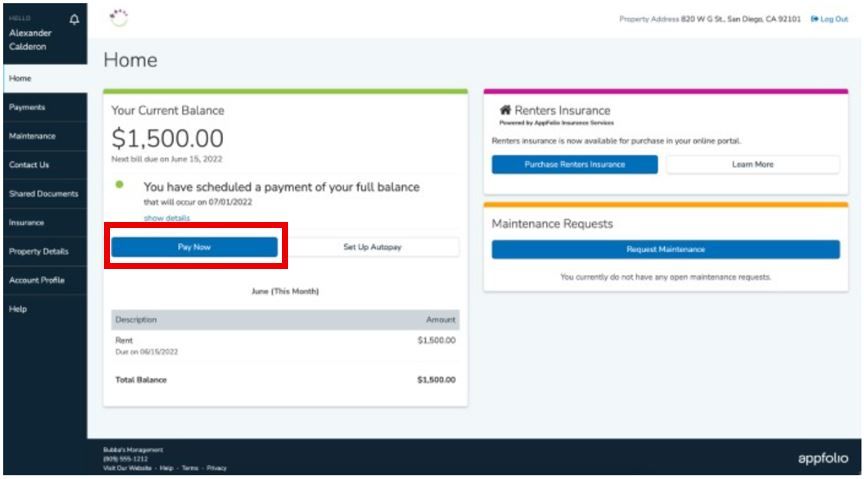
Making a One-Time Payment
Pay rent securely through your AppFolio Resident Portal using your computer or smartphone.
- Log into your Resident Portal.
- Select Payments.
- Click Pay Now.
- Enter the amount you wish to pay.
- Select your payment method.
- Review the payment details and click Submit.
We recommend selecting eCheck (ACH) because it has no additional online payment fee. Credit and debit card payments typically include a significant processing fee, which will be shown before you submit the payment.
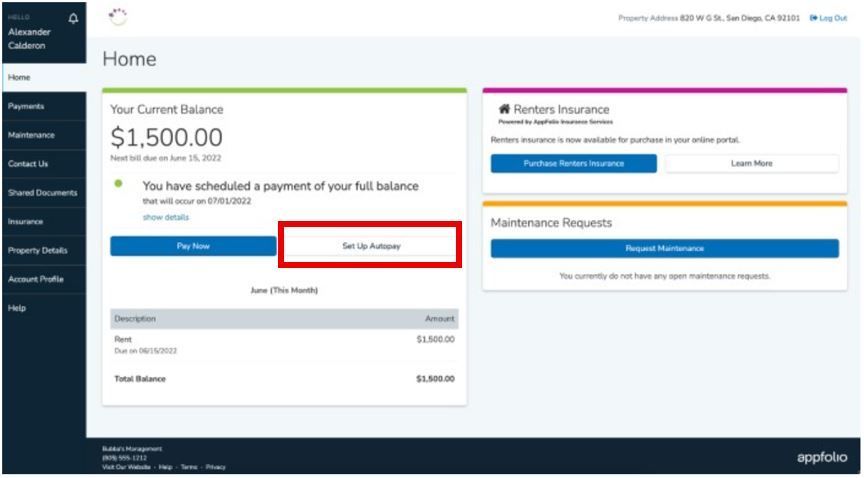
Set Up AutoPay
AutoPay can automatically submit your rent payment each month and help you avoid missed payments or late fees.
- Log into your Resident Portal.
- Select Payments.
- Click Set Up AutoPay.
- Select eCheck (ACH) as your payment method.
- Choose whether to pay your full balance or a fixed amount.
- Select your payment date.
- Review the details and click Create AutoPay.
AutoPay using eCheck (ACH) has no additional online payment fee. Review your AutoPay settings whenever your rent, bank account, or lease terms change.
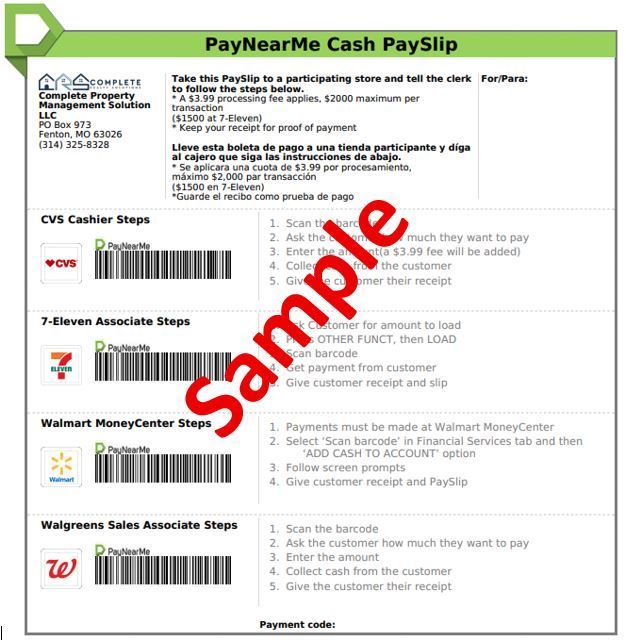
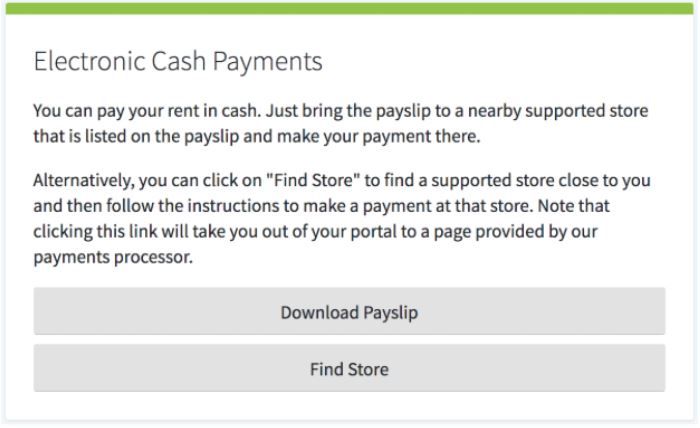
Use an Electronic Cash Payment Voucher
Residents who prefer to pay with cash can use an AppFolio Electronic Cash Payment Voucher, also called a payslip.
- Log into your Resident Portal.
- Select Payments.
- Download your Electronic Cash Payment Voucher by clicking “Download Payslip” from the Electronic Cash Payments block.
- Take the voucher to a participating retailer.
- Present the barcode and cash payment to the cashier.
- Keep your receipt until the payment appears in your Resident Portal.
Participating retailers may include Walmart, CVS, Walgreens, 7-Eleven, Dollar General, and Family Dollar. Retailer fees may apply, and cash payments may take additional time to post.
Residents without access to a printer may ask their Leasing Manager to print the voucher.
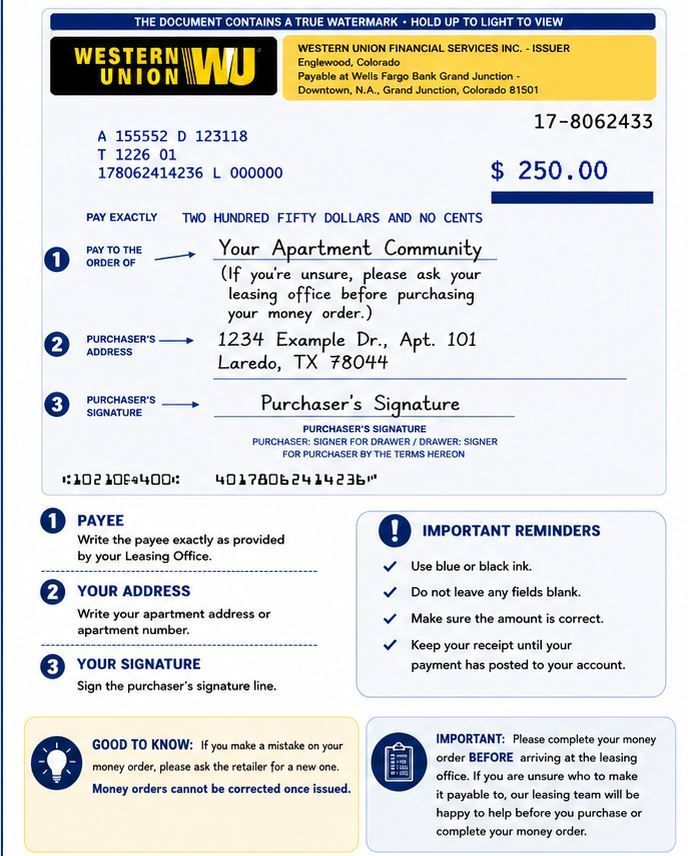
Complete a Money Order
Complete your money order carefully so the leasing team can identify and apply your payment correctly.
Before submitting it:
- Write your full name.
- Include your apartment address or apartment number.
- Sign the purchaser’s signature line.
- Confirm that the payment amount is correct.
- Keep the detachable receipt until the payment appears in your account.
Do not leave required fields blank or make corrections on the money order. If you make a mistake, ask the retailer whether it must be replaced.